


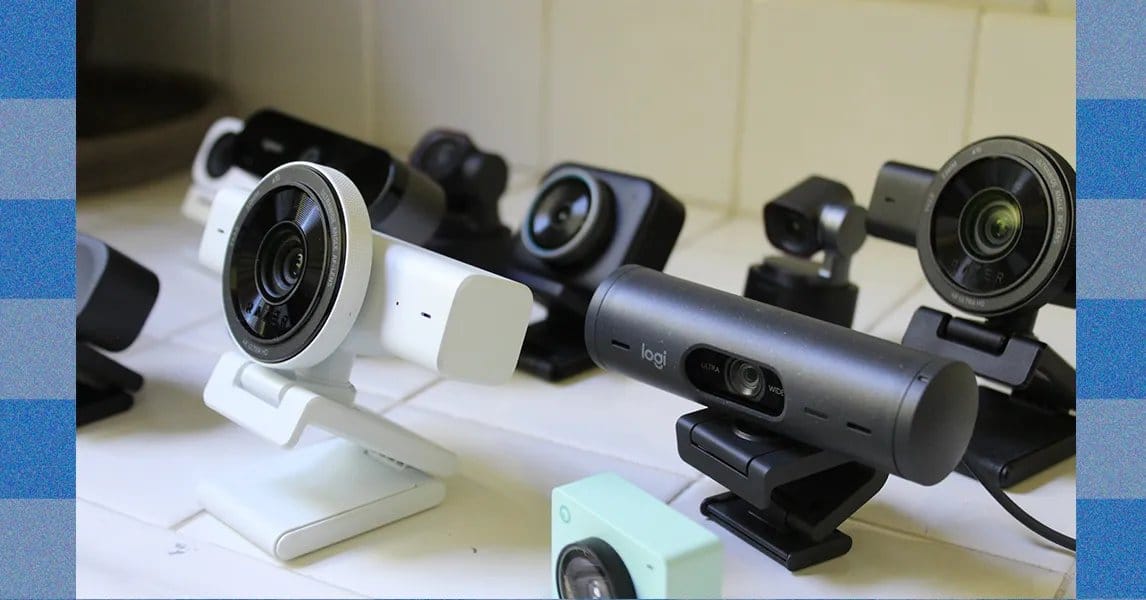
The Insta360 Link 2C Pro magnetizes to its strong aluminum mount, and I never worried about it falling back, even with the weight of the USB-C cable pulling on it. This also makes its panning adjustments super-smooth. It’s surprising how many webcams struggle with this very simple motion, but it’s perhaps the result of many mounts being plastic—including the Logitech MX Brio. Because the Insta360 is magnetic, it can also stick to any other metal surface, which can be convenient if you’re looking to shoot from a different angle.
In terms of image quality, no webcam at this price delivers lowlight performance on par with the Insta360 2C Pro. Right out of the box, without even tweaking any settings, I was impressed by its ability to handle harsh light. Like all the cameras, I tested it in some poor conditions, including under overhead office lighting and being backlit. The webcam handled these scenarios better than its competitors. It avoided blowing out the highlights and could deliver as much detail in the image as possible, even compared to more expensive webcams, like the Obsbot Tiny 3 ($349).
I also noticed its very natural image-processing contrast compared to options like the Logitech MX Brio, which tended to crush blacks. Under better lighting, the sharpness of the image really stood out. Thanks to that large 1/1.3-inch CMOS sensor, objects in the background fall out of focus in a natural bokeh effect. It mimics the look of a DLSR better than any camera I tested. Other webcams look flat by comparison.
It’s not perfect—no webcam is. Sometimes there’s a bit too much processing and smoothing for my taste, especially in some of the details around the face. And out of the box, the colors skew a bit cool. The easy-to-use software makes adjusting these issues easy, but it’s something to be aware of nonetheless. Hopefully, by now, you’ll be convinced that there’s little reason to buy the Logitech MX Brio over the Insta360 2C Pro. Logitech has a lot of brand equity in the world of webcams, but considering both models retail for $200, Insta360 definitely has the superior product.
The standard Insta360 Link 2C ($150) is also a strong option. It’s $50 cheaper, with a slightly smaller sensor and narrower aperture, resulting in worse low-light performance. I noticed that it introduced more noise, especially in areas of high contrast, such as along my hairline. But let’s be real: Though you can hunt down the differences between these two webcams, the standard Link 2C still punches above its weight for the price.
One of the biggest disadvantages of the non-Pro model, though, is in microphone quality. The Insta360 2C is more in line with other webcams I tested. It uses just a single microphone and lacks the ability to pick up the deeper frequencies in my voice, whereas the 2C Pro uses a dual-microphone beam-forming system that does a far better job capturing the fuller spectrum. I still think that the Insta360 Link 2C is one of the best options at around $150, though, handily beating out models like the Razer Kiyo V2 and Logitech Brio 4K.
Cheap Webcams That Get the Job Done
Proceed very carefully with the following recommendations. That’s especially true if you are working from a laptop with a built-in camera or already have a decent webcam. In general, I suggest dishing out some extra cash for one of the more premium options listed above, or buying a light to help your existing camera work better. Even a simple lighting accessory, like the $70 Logitech Litra Glow, will dramatically improve the quality of your video calls more effectively than buying a budget webcam.
That said, if you’re using an external monitor and need a budget-friendly webcam to pair with it, there are a couple of decent options to consider. The Anker PowerConf C200 ($66) is the best of the bunch that I’ve tested. It has issues, such as the built-in mount, which can’t swivel left or right. It also doesn’t grip the monitor as effectively as I’d want. While the 5-megapixel camera can’t compare with the larger sensors in the more premium webcams, the image quality is decent enough, especially if your room has nice light and you don’t mind tweaking the picture quality in the software.
I’d also hesitantly recommend the Logitech Brio 300 ($60). Like the C200, it has a number of deficiencies. On this model, those drawbacks include an unappealing sticky pad built into the integrated mount and the built-in cable. The microphone also won’t be much of an upgrade over the ones built into MacBooks, though it’s still better than built-in mics on many of the Windows laptops I’ve tested. I also don’t like that the Brio 300 has a fixed 70-degree field-of-view, which gives it a smaller framing than all the other webcams I’ve tried.